
Skip to content

OpenShift Observe: Understanding the Operators

OpenShift Observe is a comprehensive monitoring and troubleshooting solution designed for applications running within the OpenShift platform. It provides a suite of tools for collecting, analyzing, and visualizing application and infrastructure metrics, enabling proactive identification and resolution of issues. A key aspect of OpenShift Observe is its extensive use of Operators.

What is an Operator?

In the context of Kubernetes, an Operator is a specialized software extension that automates the management of complex applications.

  • Core Functionality: Operators act as controllers, continuously monitoring the state of an application and taking actions to ensure it remains in the desired configuration. This includes tasks like deployment, scaling, upgrades, and troubleshooting.

  • Application-Specific: Operators are designed to manage specific applications or services, such as databases, messaging systems, or monitoring tools.

  • Key Characteristics:

    • Automation: They automate many of the manual tasks involved in managing applications, reducing operational overhead.

    • Declarative: Operators define the desired state of the application, and the operator automatically reconciles any deviations.

    • Extensibility: Operators extend Kubernetes functionality by introducing custom resource definitions (CRDs) to manage application-specific configurations.

Benefits of Using Operators:

  • Improved Reliability: Operators help ensure the continuous availability and stability of applications by automatically handling failures and performing necessary maintenance tasks.

  • Enhanced Scalability: Operators can dynamically adjust the resources allocated to applications based on demand, ensuring optimal performance and resource utilization.

  • Simplified Management: Operators provide a centralized and automated way to manage complex applications, reducing the need for manual intervention.

  • Increased Efficiency: By automating routine tasks, operators free up administrators to focus on higher-level tasks, such as application development and optimization.


Key Operators in OpenShift Observe

  • Cluster Monitoring Operator (CMO): This is the central operator for the entire monitoring stack. It manages:

    • Prometheus: Collects metrics from applications and infrastructure components.

    • Alertmanager: Routes and silences alerts based on defined rules.

    • Other components: May include Grafana, exporters for specific services, and more.

  • Prometheus Operator: Specifically manages Prometheus deployments and configurations, including:

    • Service Discovery: Automatically discovers and configures targets for Prometheus to scrape metrics from.

    • Alerting Rules: Manages and configures alerting rules within Prometheus.

  • Alertmanager Operator: This operator manages Alertmanager instances, responsible for:

    • Alert Routing: Configures how alerts are routed to different receivers (e.g., email, Slack, PagerDuty).

    • Silencing Rules: Defines rules to silence specific alerts under certain conditions.

  • Grafana Operator (Optional): Manages Grafana deployments and configurations, including:

    • Dashboards: Provisions and manages custom dashboards for visualizing metrics.

    • Data sources: Configures data sources for Grafana to connect to (e.g., Prometheus, databases).

    • User management: Manages user access and permissions within Grafana.

Benefits of Using Operators in OpenShift Observe

  • Improved Reliability: Operators ensure the monitoring infrastructure remains healthy and operational by automatically handling failures and performing necessary maintenance tasks.

  • Enhanced Scalability: Operators can dynamically adjust the resources allocated to monitoring components based on demand, ensuring the system can handle increased workloads.

  • Simplified Management: Operators provide a single point of control for managing the entire monitoring stack, reducing operational overhead and simplifying maintenance.

  • Increased Efficiency: Automation of routine tasks frees up administrators to focus on higher-level tasks, such as analyzing data and optimizing application performance.

  • Improved Observability: Operators can provide deeper insights into the health and performance of the monitoring infrastructure itself, allowing for proactive identification and resolution of issues.

In Summary

OpenShift Observe, powered by Operators, provides a robust and efficient solution for monitoring and troubleshooting applications within the OpenShift platform. By leveraging the capabilities of operators, organizations can gain deeper insights into their applications, improve operational efficiency, and enhance the overall reliability of their OpenShift deployments

Why iSteer?

Isteer specializes in helping organizations leverage the power of OpenShift and its ecosystem. With our expertise in OpenShift Observe and Operator development, we can assist you in:

  • Designing and implementing a comprehensive monitoring strategy tailored to your specific needs and requirements.

  • Developing and deploying custom Operators to manage your unique applications and services.

  • Optimizing your existing OpenShift Observe deployments for improved performance, scalability, and reliability.

  • Providing ongoing support and maintenance for your OpenShift Observe environment.


Who can benefit from OpenShift Observe?

OpenShift Observe is suitable for a wide range of organizations and industries, including:

  • Any organization that relies on critical applications running on the OpenShift platform

By partnering with iSteer, you can unlock the full potential of OpenShift Observe and gain valuable insights into your applications and infrastructure.


Transform Your Monitoring Strategy with iSteer

Whether you’re planning to migrate to microservices, optimize your OpenShift environment, or build a custom monitoring solution, iSteer is here to guide you every step of the way.

Let’s Build Something Great Together!
Share your experiences or connect with us to learn more about how we can help.

📧 Write to us at sales@isteer.com
📞 Schedule a consultation today!


Effortless Migration from TIBCO/MuleSoft to Workato: Powered by TelePort AI

Effortless Migration from TIBCO/MuleSoft to Workato: Powered by TelePort AI

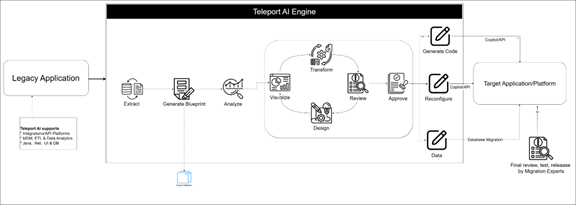
In the fast-evolving world of enterprise integration, migrating from platforms like TIBCO and MuleSoft to modern cloud iPaaS solutions like Workato can feel daunting. Legacy spaghetti code, custom schemas, and undocumented business logic slow down innovation and drive up costs. That’s where Teleport AI comes in—a next-generation, AI-powered migration toolkit that redefines how organizations modernize their integration landscape.

Modernizing Integrations with Teleport AI

Teleport AI isn’t just another migration script or ETL tool. It’s a comprehensive migration platform designed to automate, accelerate, and de-risk your move to Workato. By leveraging cutting-edge AI, deep integration expertise, and an intuitive dashboard, Teleport AI empowers customers to:

  • AI engine to extract and analyze integration code and create the process specifications and required prompts for the target copilot

  • Visualize and transform workflows with unprecedented clarity

  • Harness Workato Copilot for recipe generation

  • Seamlessly create modern, maintainable automation on Workato

  • Lower migration and maintenance costs by automating manual tasks.

  • Achieve faster migration, validation, and go-live with end-to-end automation. 

  • Save up to 70% of your migration time using Teleport and iSteer Migration experts skilled in multiple modern and legacy integration/iPaaS platforms

  • Move from planning to production-ready integrations in a fraction of a time. 

Teleport AI Migration Lifecycle

1. Extraction: Turning Legacy Code into Actionable Assets

The first step in any migration is understanding what you have. Teleport AI connects to your source system—whether it’s TIBCO BW, MuleSoft, Boomi, or even custom Java-based ESBs—and automatically extracts all integration artifacts:

  • Process flows and sub-processes
    • Mappings, schemas (XSD, JSON, CSV), and sample data
    • Scripts, services, certificates, dependencies

Teleport AI goes beyond simply copying files: it parses and reconstructs your integration logic, capturing business context, dependencies, and configuration details.

Why This Matters:

Legacy documentation is almost always outdated. Teleport AI removes guesswork by giving you a complete, up-to-date snapshot of your integration landscape, no more manual inventory, no more risk of missing a critical dependency.

2. AI-Powered Code Analysis: Make Sense of Complexity

Once your integration assets are extracted, Teleport AI’s AI-powered analysis engine takes over. It scans your legacy codebase to:

  • Identify reusable logic and common patterns
    • Highlight schema transformations and data mappings
    • Detect deprecated services and obsolete endpoints
    • Map dependencies between processes and external systems

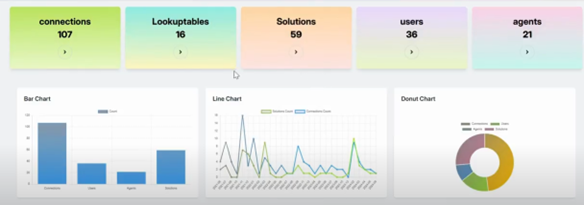
All of this is presented in an interactive dashboard, where architects and business analysts can deep-dive into any process, inspect step-by-step logic, and annotate or flag items for review.

How You Benefit:

No more black boxes. Teleport AI shines a light on even the most convoluted legacy flows, making it easy for teams to agree on what stays, what goes, and how to modernize.

3. Dashboard-Driven Transformation: From Analysis to Modernization

Teleport AI is built for collaboration and action—not just analysis. In its powerful dashboard, you can:

  • Transform or refactor legacy steps into modern patterns
    • Group steps into reusable components (perfect for Workato functions)
    • Tag business-critical logic, document exceptions, and enrich with context
    • Simulate new flow designs before generating any code

You get instant visual feedback on how your migrated flows will behave—eliminating surprises later in the project.

4. Workato Copilot Integration: AI-Driven Recipe Generation

Here’s where Teleport AI takes migration into the future: With direct integration to Workato Copilot, your extracted and transformed flows are translated into Workato prompts and recipes. Teleport AI automatically:

  • Generates Workato Copilot-ready prompts using step-by-step logic, data mappings, and schema definitions
    • Handles Workato Copilot prompt size limits by chunking and prioritizing the most critical process details
    • Sketches initial recipes using Workato’s AI, drastically reducing manual coding

Why Organizations Choose Teleport AI for Integration Migration

  • Speed: Cut migration time from months to weeks—save up to 70% in project timelines.
    • Accuracy: No missed mappings or hidden logic—everything is captured, transformed, and validated.
    • Transparency: Dashboards, visualizations, and full audit trails.
    • Future-proof: Modern, reusable Workato recipes ready for ongoing business innovation.

Ready to Modernize? Let Teleport AI Accelerate Your Migration

Integration modernization is no longer a leap of faith. With Teleport AI, you get clarity, control, and confidence at every stage of migration—from legacy chaos to Workato-powered agility. Don’t let your business get stuck in the past. Unlock the future of integration with Teleport AI.

Contact us today to schedule a demo or start your migration journey!


iSteer EMV 3D Secure Solutions: Transforming Card-Not-Present Authentication

iSteer EMV 3D Secure Solutions: Transforming Card-Not-Present Authentication

At iSteer.com, we understand that in today’s digital-first economy, card-not-present…
BenchBridge AI: Empowering Your Team, Reducing Bench Time

BenchBridge AI: Empowering Your Team, Reducing Bench Time

In today’s fast-paced business world, every moment and every resource…
Power your CPQ Business Process With Quality Items

Power your CPQ Business Process With Quality Items

The Problem Many manufacturing companies today, have many applications and systems…