

iSteer EMV 3D Secure Solutions: Transforming Card-Not-Present Authentication
At iSteer.com, we understand that in today’s digital-first economy, card-not-present (CNP) fraud continues to challenge financial institutions and merchants worldwide. As online transactions surge, so does the sophistication of fraudulent activities, making traditional security measures insufficient. That’s why we’ve developed comprehensive EMV 3D Secure solutions that combine deep technical expertise with AI-powered intelligence to deliver unprecedented results for our clients.
iSteer provides a highly configurable, scalable authentication platform that can be setup to cover card-not-present transactions (ACS/3DS) and all other authentication scenarios such as login, profile update, beneficiary addition, wallet load, card link to wallet, fund transfers etc.
The ACS (3DS) platform is fully certified by EMV and all major global card networks and is provided as a hosted (SaaS) model from the PCI DSS & PCI 3DS certified cloud setup. The enterprise multi-factor authentication platform can be set up on the public cloud or on customer’s private cloud.
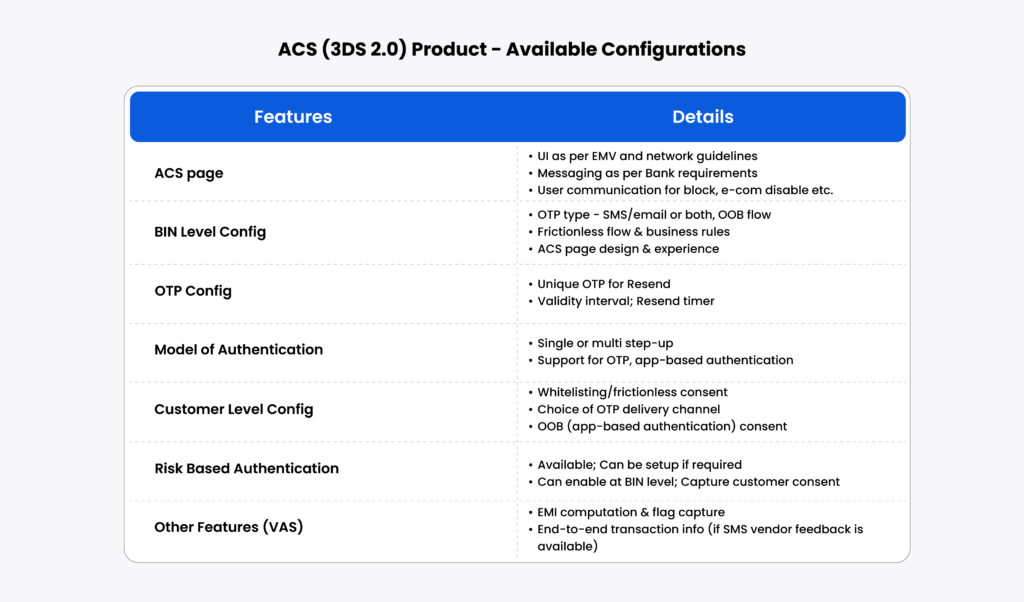
The system is designed to provide multiple authentication options that can be fully configured as per the business requirements. These include OTP (SMS, Email, IVR), knowledge-based questions, Out of band (in app) authentication such as biometrics, swipe, soft token, and silent factors, including device fingerprint and behavioral biometrics.
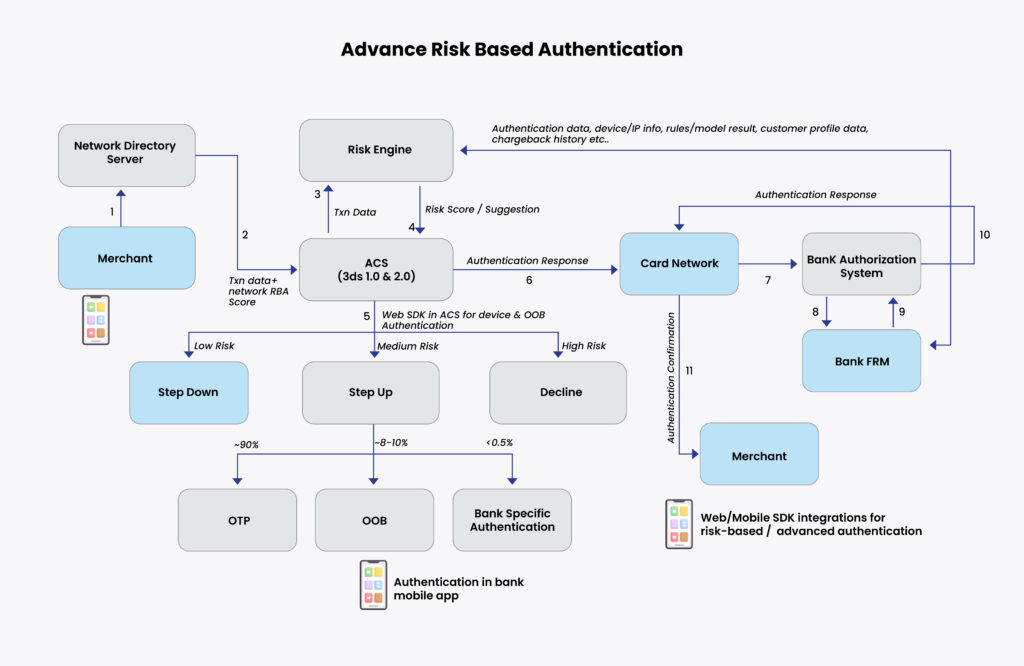
The payment security platform provided by iSteer is backed by a powerful, enterprise fraud risk monitoring system that is designed to evaluate risk real time across any channel/use cases whether financial or non-financial. The system has a highly configurable rule engine complemented by an AI-ML module to facilitate a robust risk analysis. Further, the system is equipped with a case management module to effectively track anomalies/case alerts and gather feedback to fine-tune the rules & models.
iSteer’s Comprehensive 3D Secure Solution Architecture
At iSteer, we believe that effective fraud prevention starts with understanding how EMV 3D Secure works at every level. Our solution encompasses the complete authentication ecosystem, from initial transaction processing to final authorization, ensuring seamless integration with your existing infrastructure.
Dual Authentication Experience Design
Our platform intelligently manages two distinct authentication pathways:
Frictionless Authentication for Low-Risk Transactions
When our AI determines a transaction is low-risk, authentication happens invisibly in the background. Customers see only a brief security confirmation before their purchase completes. Our system processes data points in milliseconds to make these accurate risk assessments.
Risk Based Adaptive Authentication for High Risk Transactions
For transactions requiring additional verification, our platform presents contextual challenges—SMS codes, biometric authentication, or security questions—tailored to the specific risk profile. This ensures security without abandoning legitimate customers.
iSteer’s ACS 3DS Transaction Flow
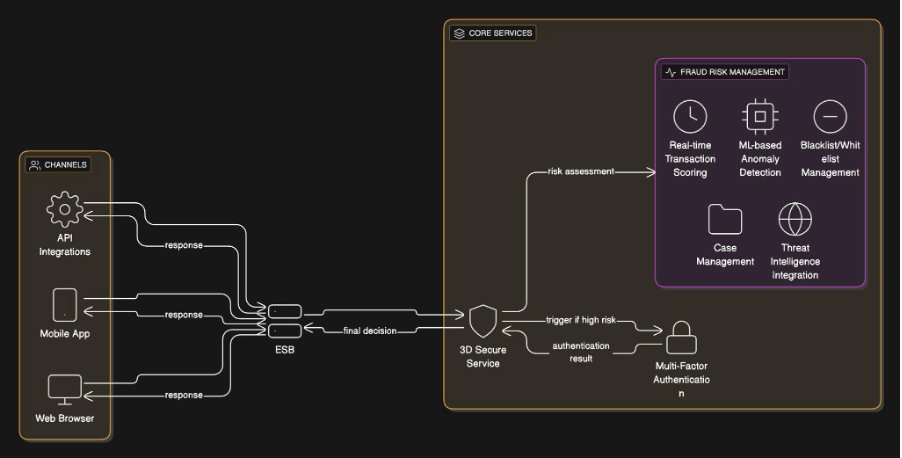
Our enterprise-grade architecture enables seamless integration with your existing systems while supporting future scalability. The diagram above illustrates how iSteer’s ESB architecture connects multiple authentication channels and methods.
Advanced Risk Based Authentication:
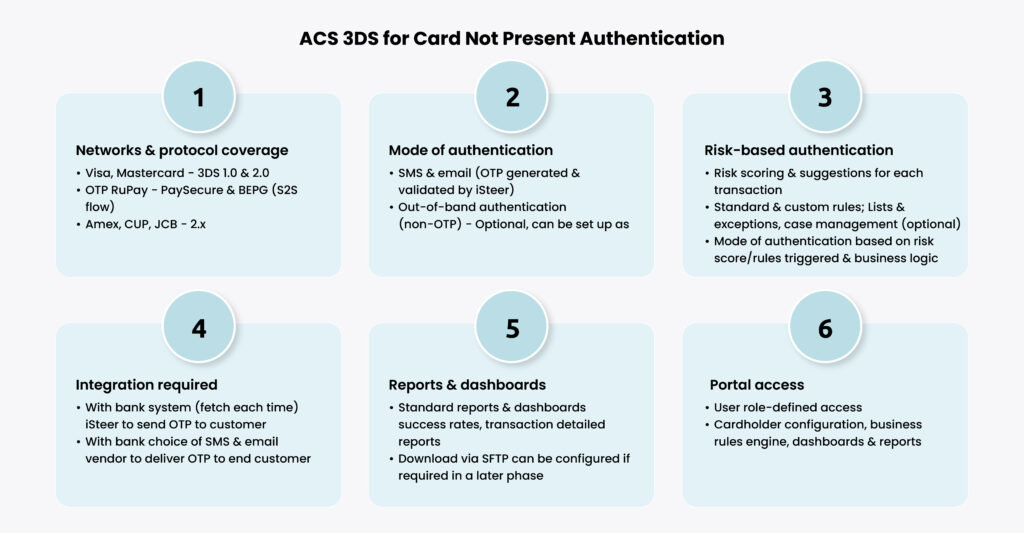
Key Integration Capabilities:
Multi-Channel Support: Unified authentication across mobile apps, web portals, API integrations, and partner channels
• Centralized Authentication Hub: Our ESB orchestrates authentication requests between your Fraud Risk Management (FRM) systems, Business Rules Engine (BRE), and Multi-Factor Authentication (MFA) infrastructure
• Comprehensive Authentication Methods: Seamless integration of OTP, Out-of-Band authentication, Silent Auth, SSO, Captcha, Knowledge-Based Authentication, and custom API workflows
iSteer’s AI-Powered Intelligence Platform
The platform is backed by a powerful, enterprise fraud risk monitoring system that is designed to evaluate risk real time across any channel use cases whether financial or non-financial.
The system has a highly configurable rule engine complemented by an AI-ML module to facilitate a robust risk analysis.
Also, the system is equipped with a case management module to effectively track anomalies/case alerts and gather feedback to fine-tune the rules & models.
iSteer’s Management and Control Platform
Intelligent Policy Manager
Our Policy Manager empowers your team to create sophisticated rules based on real-time data and customizable policies that align with your organization’s risk tolerance and business objectives. The system ingests transactional data from global networks and orchestrated risk signals to render accurate, consistent decisions.
Advanced Case Manager
Track, research, and manage potential fraud events with detailed transaction analysis through our intuitive Case Manager. When suspected fraudulent transactions occur, our system automatically generates cases for investigation, enabling your fraud analysts to identify attack vectors and fraud patterns for continuous improvement.
Flexible Configuration Manager
Optimize challenge flows and user interfaces on your timeline with our Configuration Manager. Maintain consistent branding across up to six languages while accommodating diverse payment methods. This flexibility allows complete customization of cardholder challenge flows without requiring additional professional services.
iSteer’s Advanced Feature Set
Adaptive Step-Up Authentication
Our platform provides personalized user interfaces with flexible authentication options including One-Time Password (OTP), token workflows, and Out-of-Band (OOB) authentication. High-risk transactions automatically trigger the most appropriate challenge method while maintaining optimal user experience.
Real-Time Analytics and Reporting
Track your ROI with comprehensive dashboards featuring key metrics including fraud detection rates, intervention rates, transaction volumes, and values. Our analytics platform helps you analyze site traffic, transactions, business trends, and performance data for continuous optimization.
Why iSteer’s EMV 3DS 2.0 Implementation Leads the Market
Our enhanced 3D Secure protocol implementation delivers significant advantages over legacy systems:
• Streamlined Processing: Reduced steps for both frictionless and challenge flows
• Enhanced Intelligence: More comprehensive risk assessment data integration
• Mobile-First Design: Native support for mobile and in-app transactions
• Superior User Experience: Dramatically reduced unnecessary challenges
• High Performance: Faster processing and response times
• Advanced Authentication: Full support for biometrics and behavioral analysis
iSteer’s Proven Implementation Methodology
Our successful 3D Secure implementations follow a proven methodology:
1. Comprehensive Risk Assessment
We begin by thoroughly understanding your current fraud landscape, transaction patterns, and business objectives.
2. Seamless Technology Integration
Our team ensures flawless integration with your existing systems, minimizing disruption while maximizing capability.
3. Intelligent Policy Configuration
We work with your team to set appropriate risk thresholds and challenge rates based on your specific business requirements.
4. Continuous Performance Monitoring
Ongoing optimization based on real transaction data ensures your system continues to improve over time.
5. Customer Experience Optimization
We rigorously test and refine authentication flows to ensure smooth customer experiences across all scenarios.
The Future of Authentication (Fraud Prevention) with iSteer
As digital commerce continues to evolve, iSteer remains at the forefront of fraud prevention innovation. Our platform incorporates emerging trends, including
• Real-time Behavioral Analysis: Advanced pattern recognition for immediate threat detection
• Enhanced Device Intelligence: Comprehensive device profiling and risk assessment
• Contextual Authentication: Smart authentication that adapts to user context and behavior
• Predictive Fraud Modeling: AI-powered prediction of emerging fraud patterns
• Seamless Omnichannel Experiences: Consistent security across all customer touchpoints
Ready to Transform Your Fraud Prevention Strategy?
The results speak for themselves: financial institutions partnering with iSteer consistently achieve 8-figure profit improvements while enhancing customer experience. Our comprehensive 3D Secure solutions combine sophisticated risk assessment, flexible authentication methods, and seamless integration capabilities to create a powerful platform that drives both security and profitability.
Contact iSteer Today sales@isteer.com